Dispatch Portals

Loop ERP Modules & Features

Orchestrate Outbound Logistics with Precision and Flexibility

In the circular economy, outbound logistics isn’t just about shipping finished goods—it’s about coordinating complex flows of refurbished products, recycled materials, reverse shipments, and multi-stop pickups. Loop ERP’s Dispatch Portals are built to handle the chaos of modern circular logistics, giving your warehouse and logistics teams real-time visibility, centralized coordination, and intelligent routing across every dispatch point.

img
icon

What It Does

The Dispatch Portals feature function in Loop ERP provides a centralized command center for outbound inventory movements—whether you're shipping to customers, returning to suppliers, dispatching to refurbishers, or transferring between facilities. Empower your team to manage multiple shipping workflows, carrier integrations, and documentation in one unified portal.

What is a Dispatch Portal in ERP?

A dispatch portal in ERP is a centralized interface where warehouse and logistics teams manage all outbound shipment activity — scheduling loads, assigning carriers, generating documentation, and tracking shipments from the moment a pick order is created to the moment goods leave the facility. In standard ERP systems, dispatching is either an afterthought or handled through separate tools that don't connect to inventory, grading, or financial records. For businesses that deal in circular flows — returns, refurbished goods, recycled materials, and multi-stop pickups — that disconnect is a real problem. A purpose-built dispatch portal connects condition data, carrier integrations, and shipping documentation in one place, so the right item goes to the right destination based on its grade and inspection status, not a manual decision made outside the system.

Expanded Key Features

icon

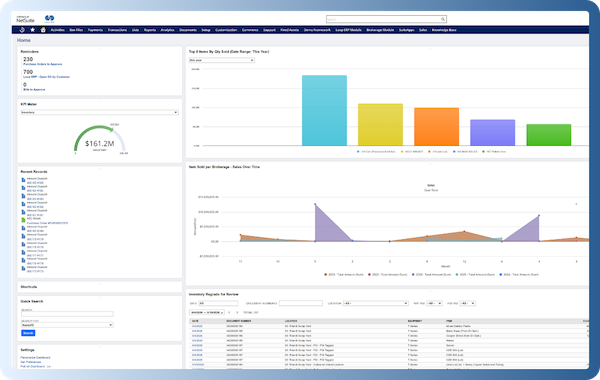
Centralized Dispatch Dashboard

Manage all pending, scheduled, and in-transit shipments from a single interface. Filter by location, shipment type, grade, carrier, or urgency.

icon

Multi-Destination, Multi-Channel Fulfillment

Handle complex shipment scenarios with ease—whether it's a refurbished item heading to resale, a return going to disassembly, or a pallet moving to a third-party logistics partner.

icon

Carrier & 3PL Integrations

Seamlessly integrate with shipping providers and logistics partners for real-time label generation, tracking updates, and freight management.

icon

Automated Labeling & Documentation

Automatically generate and print shipping labels, manifests, bills of lading, customs forms, and condition statements—tailored to the nature of the goods and their destinations.

icon

Reverse & Return Dispatch Handling

Support reverse logistics dispatches for returns to supplier, warranty exchanges, product recalls, or downstream recycling partners.

icon

Grade-Filtered Picking & Packing

Ensure the right condition item gets dispatched by enabling warehouse teams to pick based on grade, certification status, or last inspection date.

icon

Transfer Orders & Internal Movements

Easily manage inter-facility shipments—whether you're sending stock to a refurbishment site, a field location, or a distribution center.

icon

Mobile-Friendly Interface for Warehouse Teams

Dispatch Portals are optimized for tablet and handheld use, allowing on-the-ground staff to manage loads, confirm pickups, and print labels from anywhere in the warehouse.

img

Smart Dispatch

Designed for Circular Outbound Logistics

Dispatch in the circular economy is about more than boxes out the door—it’s about managing diverse product states, non-linear flows, and sustainable outcomes. With Loop ERP Dispatch Portals, you can:

  • Direct refurbished goods to resale and core returns to recycling
  • Route items to partners based on grading and inspection outcomes
  • Maintain traceability of condition and custody in every load
  • Reduce logistical waste and improve operational responsiveness

From Chaos to Coordination

Loop ERP’s Dispatch Portals help you tame the complexity of outbound logistics in circular business models—whether you're shipping to a customer, reclaiming inventory, or moving product across your own network.

Book a Demo
img

Blogs

Latest Insights

See All Blogs
icon

May 5, 2026

Aggregate Management Software: Why Generic ERP Falls Short (and What Does the Job)

icon

April 23, 2026

EPR Reporting for Scrap Recyclers: What Your ERP Needs to Handle in 2026

icon

April 13, 2026

What Is Scrap ERP? And Why Generic Systems Fail Scrap Metal Recyclers

See All Blogs

Frequently Asked Questions

Everything you need to know about Loop ERP

Can Loop ERP handle large-scale operations?

icon

Yes. Loop ERP is built on NetSuite, the same platform used by enterprise operators, multi-site businesses, and high-volume processors. It handles multi-entity accounting, consolidated reporting across locations, high daily transaction volumes, and complex settlement structures without slowing down. If you are running one site today and five next year, you do not need to replatform to keep up.

How long does it take to implement Loop ERP?

icon

Implementation time varies, depending on the number of locations, material streams, and integrations involved (scales, cameras, payment processors, third-party logistics). The Loop ERP team handles data migration, workflow configuration, integration, and training in parallel, and we work directly with your operations leads, not just IT, so the system matches how your business actually runs on day one.

What makes Loop ERP different from other ERP systems?

icon

Most ERP systems treat inventory as static boxes on a shelf. Loop is built for inventory that changes grade, weight, and value at every step, which is how scrap, recycling, aggregate, brokerage, and similar materials-based businesses actually work. It is also NetSuite-native, so you do not need a separate accounting package, a middleware layer, or a patchwork of integrations to get from inbound ticket to closed financials. One login, one system, one source of truth for operations and finance.

What support does Loop ERP offer?

icon

Loop ERP provides implementation support, training for operations and finance teams, and ongoing technical support after go-live. Clients get access to documentation, how-to guides, and direct consultation with our team for troubleshooting, configuration changes, and new workflow setup. Support is handled by people who understand the difference between a ticketing issue and a grading exception, not a generic help desk working from a script.

How secure is Loop ERP?

icon

Loop ERP runs on Oracle NetSuite, so your data lives inside enterprise cloud infrastructure with encryption in transit and at rest, role-based access, and audit logging on every transaction. Ticket edits, grade changes, and settlement adjustments all carry a user stamp and timestamp. If a record is overridden or reclassified, you can see who did it and when, which matters for disputes, audits, and internal controls.