Most scrap yards don't run on one system. They run on three or four, often held together by whoever on staff is best at Excel.
That's not a criticism of how these businesses got here. A yard starts with accounting software, adds scale software, then someone builds a spreadsheet for pricing and another for settlements. Each tool solved a real problem when it was added. The problem is the gap between them.
If you're planning a Q4 systems budget or scoping a January 1 cutover, the real question isn't which ERP has the most features. It's whether a system can carry a transaction from the scale house through inventory, pricing, and settlement into the general ledger without anyone re-entering the same information twice. Here's how scrap yards manage operations today, where those setups break down, and what to look for in a scrap-specific ERP.
Most operations fall into one of four patterns, often more than one at once.
Spreadsheets. Even yards running real software keep an unofficial second system in Excel, for pricing, load logs, receivables, or settlement math. Cheap and familiar, until a new commodity or pricing rule means another tab, and the process depends on whoever built the formulas. Spreadsheets are useful tools. They become a problem when they're carrying transactions that should be part of the company's system of record.
Accounting software plus scale software. A common setup pairs QuickBooks or similar with a dedicated scale-house system. The scale system captures the ticket. The accounting system handles the books. The two may exchange data through an integration, but they rarely share one transaction record in real time, so someone still reconciles tickets, invoices, and settlements by hand. The scale ticket may start a financial transaction, but it isn't treated as one until later.
Legacy scrap management systems. Older, recycling-specific software built for ticketing and basic inventory. They still handle what they were built for. The trouble starts as the business adds locations, entities, or more sophisticated pricing and financial requirements. What worked for one yard a decade ago may not give a multi-site operation the visibility it needs today.
Generic ERPs customized for scrap. Larger operators sometimes bend a mainstream ERP into shape for scrap operations. It can work, especially with real internal technology resources behind it. The question isn't whether a generic ERP can be customized to handle regrades and settlements. It usually can. The question is how much customization, integration, and manual work it takes to keep it behaving like the business actually operates.
A supplier brings material in. The scale records gross and tare weight. The load gets a grade and an initial price. Later it's processed and regraded, its value shifts with quality and market pricing, and the supplier gets settled on the final number. When those steps live in separate systems, every handoff is a chance for delays, duplication, or incorrect entry.
Reconciliation never ends. When tickets, inventory, and financials live apart, someone reconciles them by hand, daily, weekly, or at month-end. The more locations and transactions, the harder that gets.
Inventory valuation lags reality. Material gets regraded, blended, and reprocessed while its market value keeps moving. If the financial system isn't updated at the same time as the operational one, finance ends up looking at a number that no longer matches what's in the yard.
Pricing gets flattened. Scrap pricing varies by supplier, grade, quality, and market index, often booked provisionally and settled once final numbers come in. A system that only understands one fixed price pushes that gap into a spreadsheet.
Multi-site visibility disappears. One yard can paper over disconnected systems with manual work. Three or five yards can't, and someone ends up consolidating reports from every location by hand, usually well after the month has closed.
Reporting becomes a manual project. Diversion rates, recovery percentages, and chain-of-custody data should come straight out of the transactions the business already runs. Instead, someone builds that report from scratch every time a customer or auditor asks for one.
A scrap ERP has to manage the whole transaction lifecycle, not just digitize the scale ticket. On the inbound side, that's a purchase contract or order, an inbound ticket capturing gross, tare, and net weight, and a settlement reconciling price, quality, and freight. In between, it has to track regrades and production runs without losing the paper trail back to the original ticket. On the outbound side, it's the same chain in reverse: sales order, outbound ticket, and final settlement with the customer.
Pricing needs the same built-in flexibility: booking a load at a provisional price, then settling it automatically once assays, moisture tests, or market indices confirm the real value, instead of forcing someone to work out the difference by hand.
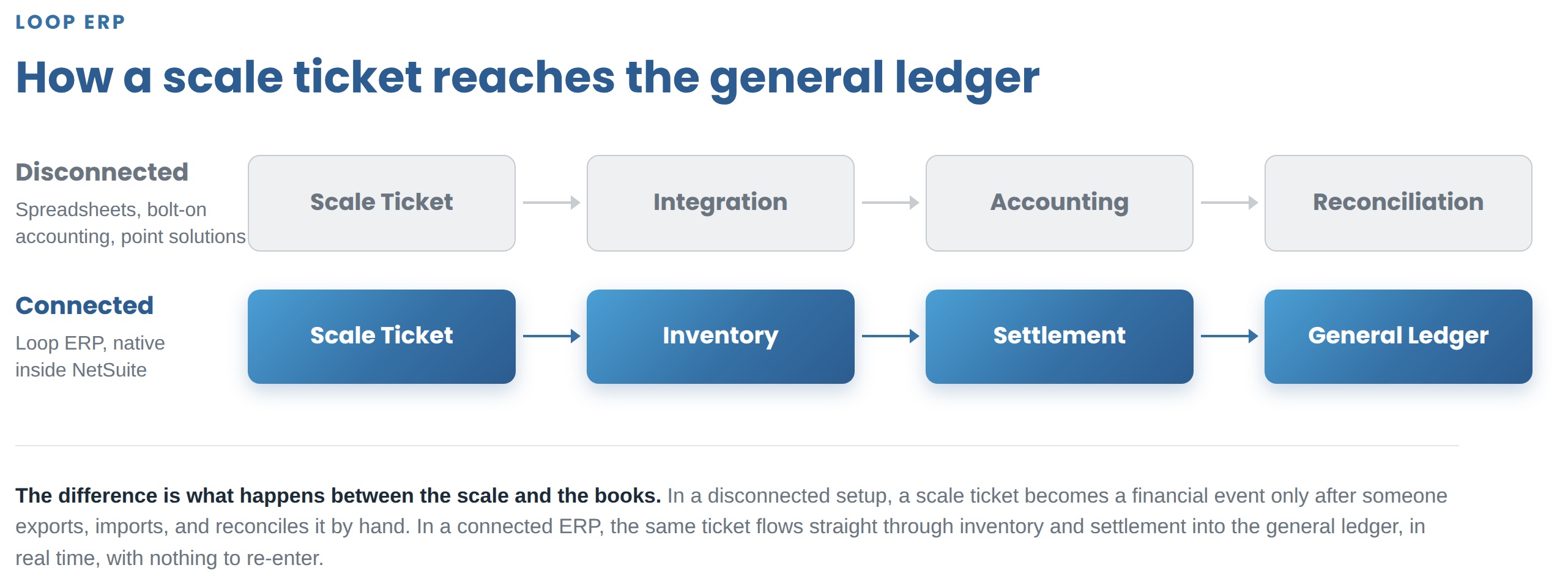
And it all needs to hit the general ledger as it happens, not on a batch schedule. That's the real difference between a scrap ERP and a patchwork of point solutions:
Disconnected: scale ticket → integration → accounting → reconciliation.
Connected: scale ticket → inventory → settlement → general ledger.
The second model gives the business one transaction record instead of several versions of the same one.
Beyond the transaction chain, a few things separate a real scrap ERP from a point solution:
Every vendor will tell you their system handles all of this. The way to find out is to ask for a demonstration, not a slide. Before signing anything, ask any vendor, Loop included:
A vendor that answers all eight on the spot has a real product to show you.
Q4 is a reasonable time to start this evaluation, since budgets are getting set and finance is already reviewing the year. That doesn't mean every project should force a January 1 go-live. A rushed implementation creates its own problems. The point of starting now is having time to make the decision properly, not to rush into one.
Loop ERP is built natively inside Oracle NetSuite for scrap and metal recycling, aggregates, brokerage, and similar materials-based businesses. There's no middleware layer between operations and finance, because there's no separate system to sync. Every scale ticket, regrade, and settlement posts straight to the general ledger as it happens.
That's what let Sortera Technologies, a scrap metal recycler in Fort Wayne, move off a setup where every transaction had to be re-entered between a scale-house system and NetSuite Starter Edition, with inventory updates running a full day behind. On Loop, purchase requisitions, production moves, and settlements happen in real time inside NetSuite, with nothing to reconcile after the fact. As COO Ben Pope put it, moving to a single NetSuite-native platform "eliminated our operational bottlenecks and kept our data in sync in real time, turning a hurdle into a driver for our growth."
There's no single ERP every scrap yard runs on. What you'll find instead is spreadsheets, accounting software, legacy scrap systems, and customized generic ERPs, patched together by hand, working fine until the business outgrows the patch.
For Q4 planning, the checklist above will tell you more in twenty minutes than any pitch deck will. If you want to see how those answers look inside a system built for scrap and materials operations, we're glad to walk you through it.
Ready to see how Loop ERP connects yard operations, inventory, and finance in one system? Book a demo and we'll show you, live.
What ERP software do scrap yards use?
Most scrap yards run a mix of spreadsheets, general accounting software like QuickBooks, legacy scrap systems, or a customized generic ERP, rather than one unified system. A smaller but growing number use purpose-built recycling ERPs that connect ticketing, inventory, pricing, and finance directly.
Why doesn't regular accounting software work well for scrap yards?
Accounting software tracks the financial side of the business but isn't built to handle scale tickets, regrades, or provisional-to-final settlement pricing. That gap between what happens at the scale and what shows up in the books usually gets closed with manual data entry.
What's the difference between scrap yard software and a scrap ERP?
Scrap yard software typically handles one function, like scale ticketing, dispatch, or inventory. A scrap ERP connects those operational functions with purchasing, sales, settlements, and financial reporting in one system.
What should a scrap yard look for in an ERP?
Look for a system that carries a transaction from the scale ticket through regrades and final settlement without re-entry, supports provisional and final commodity pricing, and posts to the general ledger in real time rather than on a batch schedule.
Should a scrap yard replace QuickBooks and spreadsheets with an ERP?
QuickBooks can work fine for a smaller operation. The better question is whether the processes around it have outgrown it: if tickets, pricing, and settlements are increasingly managed across separate tools and spreadsheets, that's a sign an ERP evaluation is worth doing.
Powerful, self-serve product and growth analytics to help you convert, engage.
Blogs
October 15, 2026
EPR Deadlines Are Coming: What Scrap and Recycling Operations Need to Report Before Year-End

October 9, 2026
Weight Tickets, Cost Per Ton, and ERP: How Aggregate Producers Connect Operations to Finance
October 1, 2026
Building the 2027 Budget: How to Make the ROI Case for a Scrap ERP Before Year-End