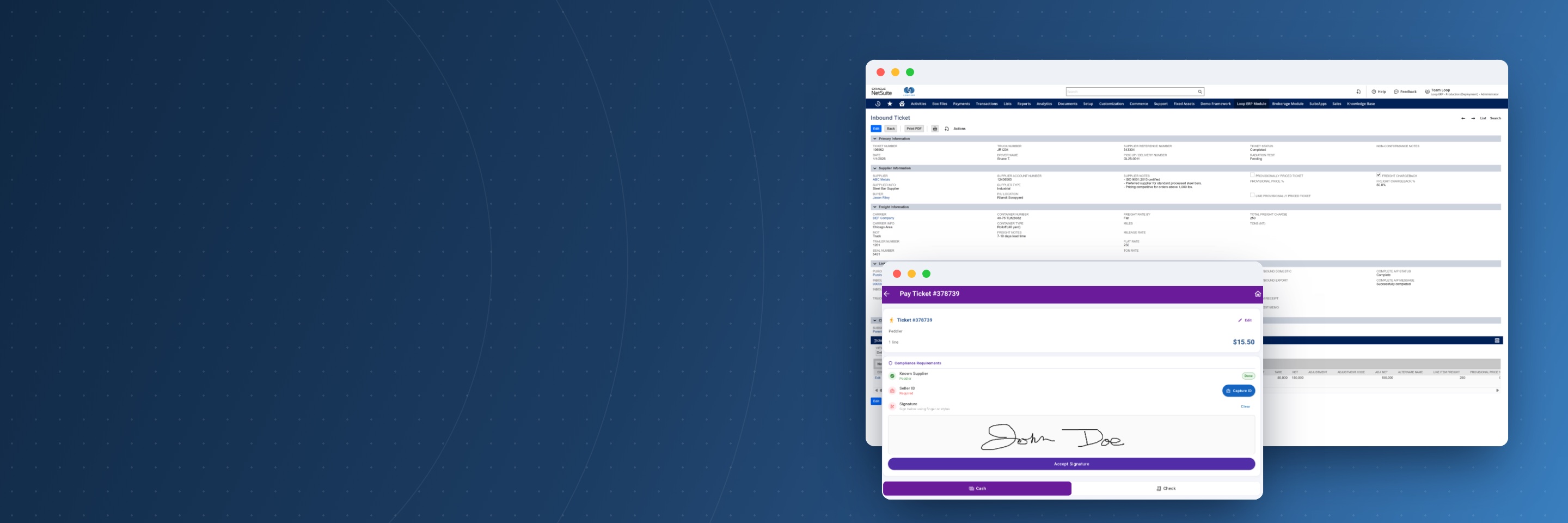
Loop ERP inbound ticket and mobile pay ticket screens inside NetSuite

Loop ERP Support: Help From People Who Know Your Operation

Keep tickets, dispatch, and settlements moving.

When something in Loop ERP isn't working the way it should, you reach a support team that understands both the software and the work behind it: scale tickets, regrades, dispatch, and the NetSuite financials they feed. Send us the issue, and we diagnose it, work it to a fix or a workaround, and keep you updated along the way.

Coverage

What Does Loop ERP Support Cover?

Loop ERP support is the help desk for the Loop ERP application running in your NetSuite account. It covers reproducible problems in the software: errors, unexpected behavior, and workflows that stop working as designed. Setup and change requests go to our Professional Services team, so every request reaches the people best placed to handle it.

Handled by Support

  • Diagnosing and confirming software defects
  • Bug fixes and patches
  • Workarounds while a permanent fix is built
  • Data errors caused by a software defect
  • Errors and unexpected system behavior

Handled by Professional Services

  • New users, roles, and permissions
  • Workflow, form, and field changes
  • New reports, dashboards, and saved searches
  • Data imports and migrations
  • New modules, sites, and integrations
  • Training for new hires and new modules

Not sure which one you need? Send it to support, and we'll route it.

Get Help

How to Reach Loop ERP Support

Pick the path that fits your request. If you're not sure where to start, email support and we'll route it.

01

Submit a Support Ticket

Best for errors, broken workflows, data problems, or anything that stopped working the way it should. Email the details and a ticket opens automatically.

Email support@looperp.ai →
02

Request a Process Review

Want to rework a workflow, report, or approval step? Our Professional Services team reviews it with your operations and finance leads and scopes the change.

Contact us →
03

Talk to Your Account Manager

Planning a new site, module, or integration? Your account manager helps plan the rollout and the licenses and environments it needs.

Contact us →

Faster Answers

What to Include in a Support Ticket

A complete ticket gets a faster, more useful first response. Before you send it, check that it covers these six things.

What you were doing

The screen, record type, and step where the problem showed up.

How to reproduce it

The steps someone else could follow to see the same result.

Record numbers

The ticket, dispatch, purchase order, or invoice numbers involved.

Screenshots or error text

A screenshot of the problem or the exact error message.

Who is affected

How many users or locations, and whether work has stopped.

Whether there's a workaround

It tells us how urgent the issue is and sets its priority.

How we prioritize tickets

Critical

Outage, data corruption, or core operations stopped with no workaround.

High

Major problems for multiple users or key workflows, with only a partial workaround.

Medium

Moderate impact, with a workaround that keeps work moving.

Low

Minor or cosmetic issues with little effect on operations.

Questions

Loop ERP Support FAQs

How do I contact Loop ERP support?

Email support@looperp.ai with what you were doing, the steps to reproduce the problem, any record numbers, and a screenshot if you have one. Each email opens a ticket.

Does support cover configuration changes?

No. Support fixes problems in the software. New users and roles, workflow or form changes, reports, data imports, and new modules are handled by Professional Services. If you're not sure which you need, send it to support and we'll route it.

What if the problem is in NetSuite, not Loop ERP?

Tell us anyway, and we'll confirm where the issue comes from. Issues in the NetSuite platform itself fall under your Oracle agreement, and we'll explain how your support plan handles them.

How are tickets prioritized?

By severity. An outage, data corruption, or core operations stopped with no workaround comes first. Then issues affecting multiple users or key workflows, then moderate problems with a workaround, then minor or cosmetic issues.

Can support train new team members?

Training for new hires, refreshers, and new modules runs through our training team as a Professional Service. See training options.

Book a demo

Talk with Loop ERP

See how Loop ERP connects scale tickets, dispatch, inventory, settlements, and NetSuite financials in one system, with no exports, re-entry, or month-end reconciliation.

  • Your workflow, live. Walk a load from the scale ticket to the general ledger in NetSuite.
  • Industry experts. Talk with people who know scrap, recycling, aggregates, and brokerage.
  • A clear next step. Leave with a picture of what implementation looks like for your operation.

Request a demo

Share a few details and we'll set up a time that works for you.

Blogs

Latest Insights

See All Blogs
icon

October 21, 2026

Year-End Physical Inventory: How to Get Your ERP Data Ready Before Count Day

icon

October 15, 2026

EPR Deadlines Are Coming: What Scrap and Recycling Operations Need to Report Before Year-End

icon

October 9, 2026

Weight Tickets, Cost Per Ton, and ERP: How Aggregate Producers Connect Operations to Finance

See All Blogs