Scrap ERP is enterprise resource planning software built specifically for scrap metal recycling and similar materials-based industries. It connects scale tickets, settlements, regrades, inventory, dispatch, compliance, and finance inside one system, so a single load entering the gate produces one continuous transaction record from intake to general ledger.
What's in this guide
If you run a scrap metal recycling operation on a generic ERP, you already know the feeling. The system was built for businesses that sell finished goods at fixed prices, and your business is the opposite of that. Material moves at the speed of commodity markets. Pricing changes by the hour. Grades shift after processing. Settlements depend on weights, deductions, and contract terms that no off-the-shelf invoice screen was ever designed to handle.
That gap, between how the software works and how the yard actually runs, is where every spreadsheet, every workaround, and every late-night reconciliation comes from. Scrap ERP exists to close it.
This guide explains what scrap ERP is, what it should handle natively, where generic systems break down, and how to evaluate the options on the market. It is written for owners, controllers, IT leads, and operations managers who already feel the cost of running scrap on the wrong system and want a clear way to think about a replacement.
The phrase covers a specific class of software, not a feature checklist. A scrap ERP starts from the assumption that material is bought by weight at variable grades, processed in ways that change cost basis, and sold on contracts that may settle on a market index weeks after the truck leaves the yard. Every other module in the system, from dispatch to AR, is shaped around that reality. That is what separates a scrap ERP from a generic ERP with industry add-ons or a yard tool with an accounting export.
The category exists because scrap recycling does not fit the assumptions baked into generic ERP. A scrap business does not sell fixed SKUs at fixed prices. It buys inbound material by weight at variable grades, processes it (sometimes reclassifying it in the process), and sells it on contracts that may settle days or weeks later based on market indices. Every step generates accounting consequences that a generic system either ignores or forces a human to reconcile by hand.
A purpose-built scrap ERP handles the full operational and financial chain inside one environment. Scale tickets flow into inventory and settlement processing automatically. Regrades update cost basis at the moment they happen. Inbound and outbound logistics, dispatch, quality control, and compliance reporting all share the same data model. The finance team is not waiting on operations to send a spreadsheet. Operations is not guessing at the financial implication of yesterday's intake.
When scrap operators talk about "scrap ERP," they usually mean software that does this end-to-end. When generic ERP vendors talk about it, they usually mean their core product plus a custom build. Those are not the same thing, and the difference shows up in implementation cost, daily friction, and how reliable the financial picture looks at month-end.
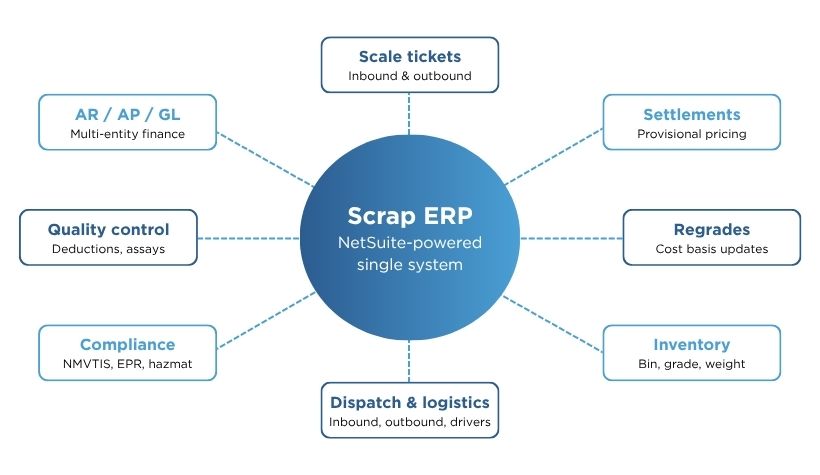
Scrap metal recycling looks deceptively simple from the outside: take material in, process it, ship it out. Inside the operation, every one of those steps is a high-frequency, high-variability transaction with downstream financial consequences.
Start with intake. A truck arrives with a mixed load of nonferrous material. The yard weighs it inbound, sorts and grades it, weighs the empty truck on exit, and generates a scale ticket. That ticket is not a receipt. It is the source of truth for the supplier's purchase settlement, the new inventory entry, and the cost line that will eventually post to the general ledger. Three workflows just kicked off from one weighing event.
Now multiply that by the number of loads in a day, across multiple yards, with grades that may get reclassified after processing. Layer in commodity prices that move while the material sits on the ground. Add contractual deductions, freight recovery, and the compliance documentation specific to scrap (NMVTIS for vehicles, hazmat handling for batteries and certain electronics, EPR reporting where the jurisdiction requires it, and catalytic converter records under recent state-level rules).
This is a connected web of transactions where the integrity of the financial close depends on every piece of yard activity being captured accurately and posted in real time. It is not a single workflow that a generic ERP can be configured around.
Generic ERP platforms were built for fixed catalogs of finished goods sold at fixed prices. The data model assumes SKUs, not grades. Pricing assumes a standard list, not a daily commodity index. Inventory assumes unit counts, not weight-based stockpiles. None of those assumptions match the reality of a scrap operation, and stacking customizations on top to fake them around does not make the underlying assumptions go away.
The operators who feel this most are the controllers and CFOs. They are the ones who get asked, on the third of every month, why the numbers from the yard do not match the numbers in the general ledger. The answer is almost always the same: because the data crossed three systems and a spreadsheet to get there.
A scrap ERP is the answer to that question. The system understands grades, weights, settlements, and regrades natively, so the data does not need to cross those boundaries.
The cost of running scrap on the wrong system is not a single line item. It is the sum of small inefficiencies that compound across every transaction, every yard, every month.
The pattern shows up in five specific places.
When yard activity lives in a scale or ticketing tool and finance lives in a generic ERP, somebody has to bridge them. That work falls on controllers and accountants every week and again at month-end. The reconciliation is slow, error-prone, and entirely avoidable if the two systems were one.
Scrap settlements account for grade, weight, contract terms, deductions, and sometimes provisional pricing that resolves later. Generic ERP either cannot model that logic or models a stripped-down version that requires manual override on every settlement. Either way, cash flow slows, supplier disputes go up, and the AP team spends its week fixing the math.
Weight-based, grade-specific inventory is not a native concept in most ERP platforms. Operations has one number, finance has another, and neither matches what is actually on the ground. That gap leads to mispriced outbound loads, surprise write-downs, and a real-time commodity exposure picture that is not actually real-time.
NMVTIS reporting, EPR submissions, hazardous materials handling, and catalytic converter logs all need to be tied to the underlying transactions. If they live in a separate compliance tool, every change to a scale ticket or settlement requires a duplicate update. Miss one, and the audit trail breaks.
When the way scrap actually works has been forced into a generic ERP through custom code, every platform upgrade becomes a regression test. Configurations that were once stable need to be rebuilt or revalidated. Vendors charge for the work. Internal teams lose weeks. The system gets harder to change exactly when the business needs it to flex.
The result is a patchwork: a generic ERP for the books, an industry tool for the yard, spreadsheets between them, and no single source of truth for anything important. The cost of that patchwork shows up in headcount, in delayed financial visibility, in disputes, and in the quality of decisions the leadership team can make about pricing and purchasing.
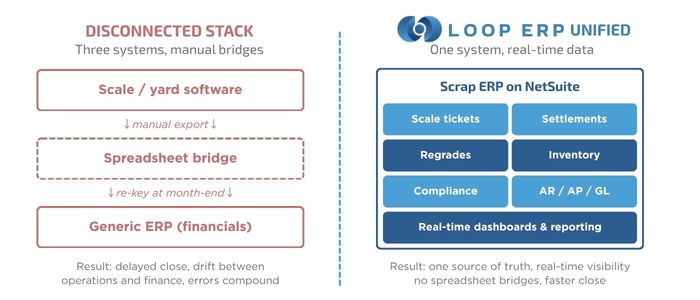
A scrap ERP is only worth the name if it handles the full operational chain natively, without bolted-on integrations and without spreadsheet bridges. The list below is the minimum scope. Any of these missing or weakly supported will create the same patchwork cost the system was supposed to eliminate.
The scale ticket is the primary transaction record. A real scrap ERP captures inbound and outbound weights at the point of weighing, ties them to a supplier or customer, attaches the commodity grade and any deductions, and feeds the ticket into inventory and settlement processing automatically. No re-entry. No nightly batch.
Settlements compute the value owed to a supplier from the ticket data, applying contract terms, deductions, and any provisional pricing the operation uses for commodities that settle later. A purpose-built system handles this calculation natively and posts the result to AP without manual override. Approvals run inside the system. The audit trail is automatic.
Material rarely leaves the yard in the same grade it came in. Bales get inspected, copper gets stripped, stainless gets sorted from a mixed load. Each of those changes is a regrade, and each one moves cost basis from one inventory line to another. A scrap ERP records the regrade as a discrete event, updates inventory, and posts the cost adjustment, all in real time. The history is preserved so you can audit how a finished outbound load was built up over weeks of intake.
Inventory in a scrap operation is held by grade, by location, sometimes by lot, and almost always by weight. A real scrap ERP tracks all three dimensions natively and reflects movements (intake, transfer, regrade, sale, write-down) in the same transaction stream as the rest of the business. Operations and finance see the same numbers.
Material does not move itself. A scrap ERP coordinates inbound pickups and outbound deliveries, assigns drivers and equipment through a dispatch module, tracks freight cost and recovery, and feeds logistics data back into the financial picture. Drivers and dispatchers should be working in the same system the controller looks at on Monday morning.
A real scrap ERP supports the QC steps that protect margin: counter-weighing, sample assays, deductions for moisture or contamination, and rejection workflows for noncompliant loads. The system records the QC outcome on the same transaction the scale ticket sits on, so the dispute trail is one click away.
Many scrap commodities settle on a price index after the material ships. That means the original sale or purchase value is provisional and will be trued up later, sometimes weeks later. A scrap ERP models provisional pricing natively, holds the open exposure on the ledger, and posts the final settlement when the index resolves. Without this, every provisional contract is a manual journal entry waiting to happen.
Scrap operators carry a meaningful regulatory load: NMVTIS reporting for end-of-life vehicles, hazardous materials documentation for certain electronics and batteries, catalytic converter purchase records under state-level laws, and increasingly EPR submissions where extended producer responsibility frameworks are in force. A scrap ERP ties compliance records to the underlying transactions so the documentation matches the books, automatically.
Most scrap operations of any scale run more than one yard, often across legal entities or regions. The system has to consolidate intake, inventory, and financials across sites in real time, with role-based access so site managers see their yard while corporate sees the whole picture through real-time dashboards.
The financial layer is not optional. A scrap ERP either includes a full AR, AP, GL backbone (multi-entity, multi-currency where it matters, revenue recognition, reporting, audit trail) or it is not really an ERP. It is a yard system pretending. Loop ERP includes this natively because it is built directly on Oracle NetSuite.

The category overlap creates a lot of confusion. Three product types compete for the same buyer, and they are not interchangeable.
Scrap yard management software runs the yard. Ticketing, weighing, dispatch, inventory tracking, sometimes basic supplier records. It does not run the books. If you use it, you still need a separate accounting or ERP system to handle AR, AP, GL, and reporting, which means you still need a bridge between the yard tool and the financial system.
Generic ERP runs the books. Strong on financials, strong on standard manufacturing or distribution workflows, weak on anything weight-based, grade-based, or commodity-priced. Configurable, but every scrap-specific behavior has to be built. Implementation gets long. Customization gets expensive. Upgrades get complicated.
Scrap ERP (purpose-built) runs both, in one system, with the industry workflows already in place. Scale tickets, settlements, regrades, weight-based inventory, provisional pricing, and compliance documentation are native, not custom. Finance and operations share the same data model.
Here is how the three options compare on the workflows that matter most:
The right question is not which of the three is best in absolute terms. It is which one matches the way your business actually runs, today and at the next stage of growth. Most scrap operators get to the conversation about ERP because the patchwork has stopped scaling. At that point, scrap ERP is usually the cleanest answer.
If you are evaluating scrap ERP options, the following 12 criteria separate purpose-built systems from systems that have been customized to look the part. Score each option from 1 (not supported) to 5 (fully native). Total possible: 60.
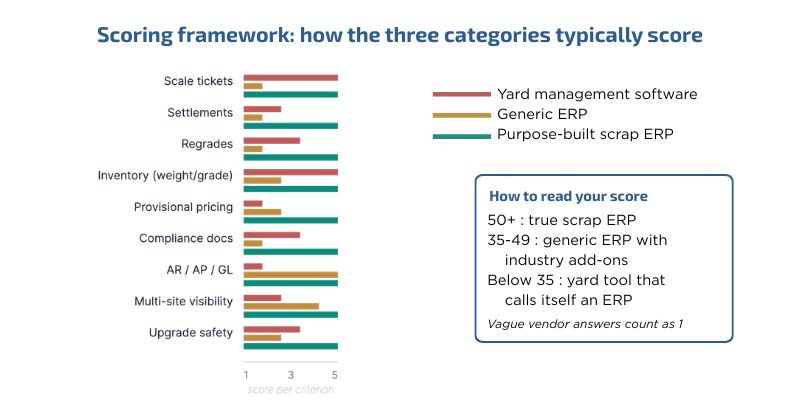
A score of 50 or above across the 12 categories suggests a true scrap ERP. A score in the high 30s or low 40s usually means a generic ERP with industry add-ons. A score below 35 means you are looking at a yard tool that calls itself an ERP.
The ranges are deliberately rough. The point of the exercise is to make the conversation specific. Vague answers like "yes, we can support that" become specific answers like "out of the box, we score this at 4 because regrades require an admin user to post the inventory adjustment manually." That is the level of detail you need to make a real comparison.
If a vendor cannot answer the 12 questions in concrete terms, that is the answer.
Book a working session, and we will walk a real scale ticket, settlement, and regrade through the system, scoring each criterion on its actual out-of-the-box behavior. Schedule a working session.
Scrap ERP fits operations where weight, grade, and commodity pricing drive the business and where the financial picture has to keep up with what is happening in the yard. The pattern shows up across several adjacent industries.
The most common entry point, though, is the operator who has outgrown QuickBooks, generic accounting tools, or standalone scale software. The patchwork worked at one yard. It stopped working somewhere between site two and site five, when manual reconciliation started eating real time and the financial picture stopped keeping up with what was happening on the ground. If that is where the business is, the ERP question is no longer theoretical. The patchwork is already costing real time, and scrap ERP is the cleanest way to stop paying that tax.
Loop ERP is a purpose-built scrap ERP for scrap metal recycling and similar materials-based industries, built directly inside Oracle NetSuite. There is no API layer between operations and finance because there are not two separate systems. Scale tickets, production moves, settlements, and GL postings all happen inside the same platform.
Here is what that looks like across the workflows that drive a scrap business.
Tickets are created at the point of weighing, with weights captured directly from the scale. Each ticket is tied to a supplier or customer, a commodity grade, a transaction type, and any deductions. There is no nightly batch, no spreadsheet bridge, no re-entry into a separate accounting system.
The moment a scale ticket is posted, inventory updates inside the same system. Bin-level tracking is built in. Operations and finance see the same numbers in the same place, with no 24-hour lag between yard activity and reporting.
Material reclassification is recorded as a discrete event. Loop adjusts inventory, posts the cost basis change, and preserves the history of how the regrade happened. Auditors get a clean trail. Controllers stop reconstructing how a finished outbound load was built up from intake.
Loop calculates settlements directly from ticket data, applying contract terms, deductions, and provisional pricing for commodities that settle later. Different weights for receiving and paying are supported. Approvals run inside the system. The settlement posts to AP automatically.
Inbound and outbound dispatch live in the same environment. Drivers, equipment, freight cost and recovery, signatures, and load photos all attach to the same transaction record the controller sees on Monday morning.
NMVTIS, EPR, hazmat, and catalytic converter records tie back to the underlying transactions. The compliance trail is the transaction trail. There is no parallel system to reconcile, and no separate database to keep aligned with the books.
Because Loop is built natively inside NetSuite, you get the full financial suite (AR, AP, GL, multi-entity, multi-currency, revenue recognition, audit trail) with operational data feeding it in real time. Forecasting reports, production efficiency metrics, yield analysis, and credit limit tracking all run on the same data set.
This is what "closing the loop between operations and finance" looks like in software. One login. One system. Total operational control. The patchwork goes away because the system was built for the job in the first place.
Loop ERP is built by people who have lived the operational pain in scrap, recycling, aggregate, brokerage, and similar materials-based industries, and the design choices reflect that. Loop ERP is also a member of the Recycled Materials Association (ReMA) and the Canadian Association of Recycling Industries (CARI-ACIR), and works alongside operators who shape the standards in both markets. The shortest way to evaluate whether the system fits your operation is to walk a real workflow through it, on a demo, with your own ticket, settlement, and regrade scenarios.
Sortera Technologies is a fast-growing aluminum scrap recycler that uses advanced sorting and AI to separate and process metals at scale. The company was scaling from one site toward ten facilities and had already moved off QuickBooks onto NetSuite Starter Edition, with ScrapIT layered on top. The combination created exactly the patchwork this guide describes.
ScrapIT did not push data into NetSuite automatically. Every transaction had to be re-keyed. Production data was tracked in spreadsheets, then entered into ScrapIT, and then entered again into NetSuite. Inventory updates lagged a full day. Back-office teams were reconciling weights, costs, and transactions manually to keep the systems aligned.
Sortera moved to Loop ERP because Loop is built inside NetSuite rather than connected to it. There is no API layer, no batch sync, no middleware. Scale ticketing, production, inventory, costing, and settlement all run directly in NetSuite. The integration problem disappeared because the integration was no longer required.
"At Sortera, our operations are defined by advanced technical prowess, but our legacy systems weren't keeping pace. Moving to Loop ERP changed that. By moving everything to a single, NetSuite-native platform, we now have a system that matches the sophistication of our process. It eliminated our operational bottlenecks and kept our data in sync in real time, turning a hurdle into a driver for our growth.”
~Ben Pope, COO, Sortera Technologies
After the switch, weight data flows directly from the scale into the ledger, daily production moves post automatically, multiple-output production is handled in one screen, and tolling inventory stays within owned locations without dummy-entity workarounds. Inventory that previously lagged a full 24 hours now updates the moment a ticket posts, and the triple-entry workflow (spreadsheet, ScrapIT, NetSuite) collapsed into a single transaction.
Read the full Sortera Technologies case study.
Running scrap recycling on the wrong system is not a software problem. It is an operating cost. Every manual reconciliation, every spreadsheet bridge, every customization that has to be retested on each upgrade is a tax the business pays for using software that was not built for the work. The longer it sits, the more expensive it gets to remove.
A scrap ERP closes that gap. The yard, the financials, the compliance work, and the leadership dashboards run inside the same system because the system was built for the way scrap actually works.
If you want to see what that looks like for your operation specifically, book a working session with Loop ERP. Bring a real scale ticket, a real settlement scenario, and a real regrade. We will walk it through the system end-to-end.

Scrap ERP is enterprise resource planning software built specifically for scrap metal recycling operations. Unlike generic ERP, a scrap ERP handles the industry's core workflows natively: scale tickets, weight-based inventory, commodity pricing, purchase settlements, regrades, and compliance reporting. The goal is to connect yard operations and finance inside a single system, eliminating the need for separate industry software, spreadsheets, or manual reconciliation.
Scrap yard management software typically focuses on the operational side of the yard: ticketing, weighing, dispatch, and material tracking. A full scrap ERP extends that into financial management, including AR, AP, settlement processing, general ledger posting, and real-time financial reporting. The distinction matters because managing operations and finances in separate systems is where most reconciliation work, delays, and data errors originate.
Generic enterprise ERP systems can be customized to accommodate scrap workflows, but the customization is substantial. Scale ticket logic, weight-based pricing, settlement calculations, and regrade tracking are not standard features. That customization is expensive to build, costly to maintain across upgrade cycles, and often produces a system that approximates your workflow rather than fitting it. A purpose-built recycling ERP, or a NetSuite scrap recycling solution designed for the industry, gives you those capabilities without the customization risk.
The terms overlap. "Scrap ERP" usually refers to systems built for scrap metal operations specifically, while "recycling ERP" is the broader category that includes plastics, paper, e-waste, batteries, tires, and other materials. A good recycling ERP will handle the same core concepts (weight-based intake, grade tracking, settlements, regrades, compliance) and adapt them to the specific commodity and regulatory context. Loop ERP supports both, because the underlying workflows are the same across most materials-based industries.
A purpose-built scrap ERP either includes scale capture natively or integrates directly with the scale software you already use. The right question is whether the integration is event-based and real-time (each weighing event creates a ticket inside the ERP automatically) or batch-based (tickets get exported and imported on a schedule). Real-time integration is what makes the rest of the system actually work. Batch integration recreates the spreadsheet-bridge problem under a different name.
Commodity pricing changes faster than any static price list. A scrap ERP supports daily or hourly price updates, ties pricing to commodity grades, and applies the right price at the moment the ticket is created. For commodities that settle later against a market index, the system holds the open exposure on the ledger and trues it up when the index resolves. The net effect is that operations can quote and settle accurately without finance having to model price changes in a separate spreadsheet.
Compliance records have to tie back to the underlying transaction (the scale ticket, the regrade, the outbound shipment) so the audit trail matches the books. A scrap ERP captures the required data at the source and generates the regulator-facing reports from the same data set. NMVTIS submissions, EPR reporting, hazardous material tracking, and catalytic converter logs all flow from transaction data rather than running on a parallel compliance system that has to be reconciled.
Implementation timelines vary based on the size of the operation, the number of yards, the integrations required, and how much process documentation already exists. Most Loop ERP implementations run a few weeks to a few months. The work breaks into discovery (mapping current workflows), configuration (chart of accounts, commodity grades, contract terms, scale integration), data migration, training, and parallel operation. A well-run implementation pays back in the first quarter through reduced reconciliation work and faster month-end close.
No. Single-yard operations benefit from a scrap ERP because they typically run on the lightest patchwork of scale tools and accounting software, which means every transaction generates manual work. Multi-site operations benefit because the consolidation problem is harder. The system is designed to scale from one yard to a multi-entity, multi-region group on the same platform, so the decision is less about size and more about whether the current setup is creating cost.
The clearest signals: month-end close takes longer than it should, the controller team spends real time reconciling yard activity to the books, settlement disputes have been climbing, leadership cannot answer "what is our commodity exposure right now?" without pulling a report, or a planned upgrade to your current ERP keeps slipping because of the customizations on top of it. Any one of those is worth a conversation. Two or more usually means the patchwork is no longer cheaper than the alternative.
Bring a real workflow. A real scale ticket from last week, a real settlement scenario including any deductions or provisional pricing, a real regrade you posted recently. Watch the vendor walk those exact transactions through the system. The right product will handle them without leaving the screen. The wrong product will reach for "we can configure that" or "that would be a custom build." The demo is not about the marketing slides. It is about whether the system handles your work the way it actually shows up.
Powerful, self-serve product and growth analytics to help you convert, engage.
Blogs

October 9, 2026
Weight Tickets, Cost Per Ton, and ERP: How Aggregate Producers Connect Operations to Finance
October 1, 2026
Building the 2027 Budget: How to Make the ROI Case for a Scrap ERP Before Year-End
September 23, 2026
Closing the Books on Q3: Why Manual Reconciliation Breaks Down at Quarter-End