Most scrap and recycling operators aren't running one piece of software. They're running an ERP, a scale system, a freight or dispatch tool, maybe a marketplace platform for buying and selling material, and a handful of spreadsheets holding the pieces together. Each system knows something the others don't, and someone on staff spends real hours every week retyping data from one screen into another.
That's the problem this article is about: how to connect the systems your yard already depends on so information moves on its own, instead of moving through a person with a keyboard.
Manual entry isn't a training problem. It's a systems problem. A freight system knows when a truck left and what it's hauling. A scale system knows the gross, tare, and net weight of every load. A marketplace platform knows what got bought or sold and at what price. None of that data has anywhere to go unless someone builds a path for it, so it gets typed into the ERP by hand, usually at the end of a shift when memory and time are both running short.
The cost isn't just labor. Rekeyed data introduces errors. A weight gets transposed. A load gets logged against the wrong purchase order. A settlement runs on a number that doesn't match what the scale actually recorded. By the time finance catches the discrepancy, the truck is long gone, and nobody remembers which number was right.
Most operations fall into one of three patterns.
The first is manual bridging: someone exports a report from the scale or freight system and imports it into the ERP, usually in a spreadsheet, usually once a day. It works until volume grows past what one person can reconcile in a shift.
The second is point-to-point integration: a developer or consultant builds a one-off connector between two specific systems. This solves the immediate problem, but it's brittle. When either system updates its software, the connector breaks, and there's rarely documentation on how it was built or who maintains it.
The third is middleware: a third-party integration platform sits between the ERP and everything else, translating data formats and managing the connections. This is more durable than a one-off script, but it adds another vendor, another monthly bill, and another system that can fail independently of the ones it's supposed to connect.
None of these approaches are wrong. They're just incomplete on their own, because the real fix isn't a smarter workaround. It's an ERP built with open, documented APIs from the start, so the connections don't have to be improvised.
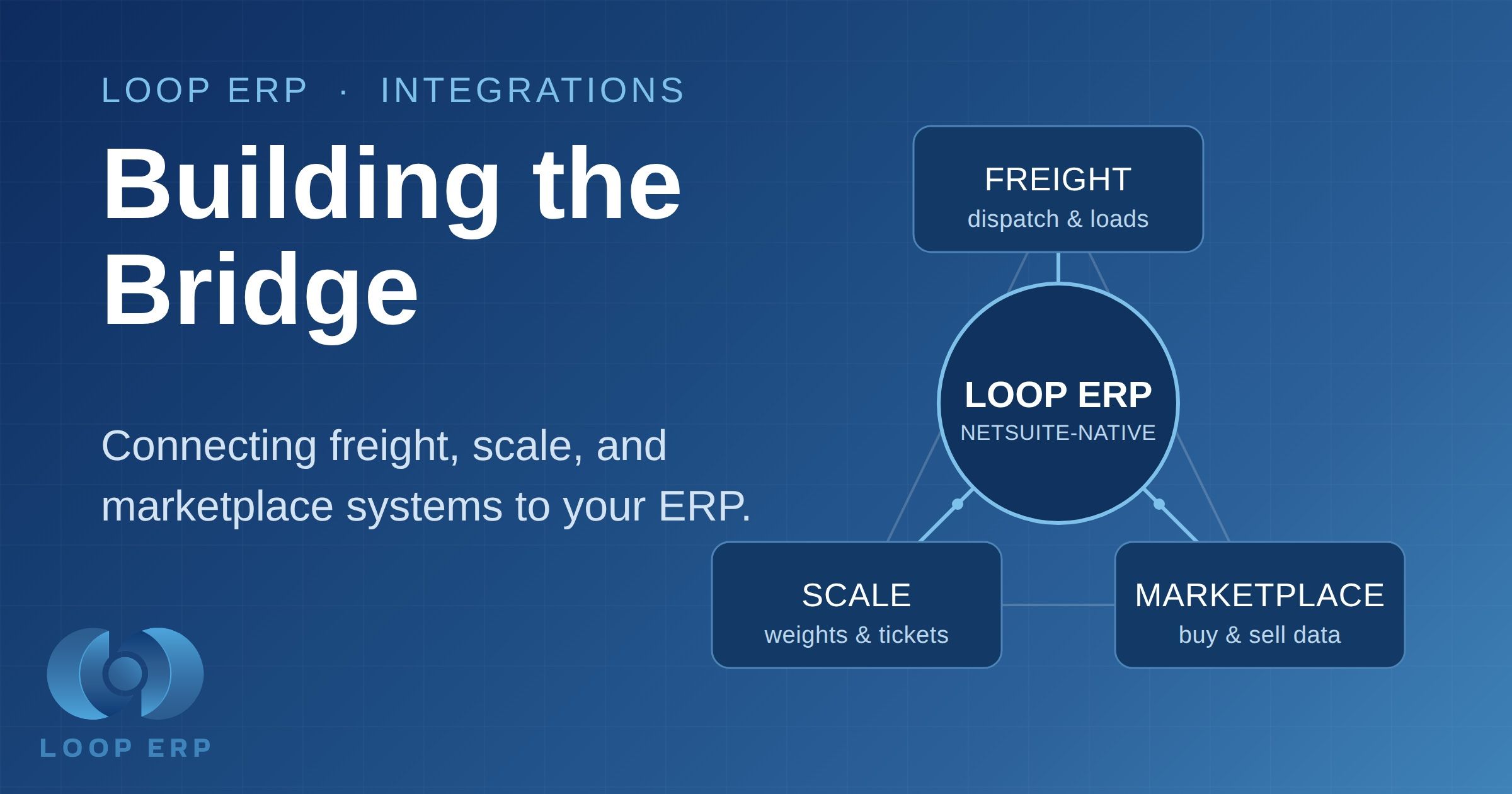
Freight and dispatch systems generate load numbers, carrier assignments, and delivery timestamps that should attach directly to a scale ticket. Without a connection, dispatch happens in one system, and the ticket gets created from scratch in another, and nothing links them until someone does it manually.
Scale software captures the gross, tare, and net weight of every transaction, along with photos and driver signatures, in many modern setups. If that data doesn't flow straight into inventory and settlement, someone reads numbers off a screen and types them into another system, and every step is a chance to get it wrong.
Marketplace systems, the platforms operators use to source or sell material, generate purchase and sale confirmations that need to become purchase orders and sales orders in the ERP. Without a connection, a trader logs the deal in the marketplace, then logs it again in the ERP, and the two records drift apart the moment either side edits something.
In each case, the pattern is the same. The data already exists. It's just stuck.
Loop ERP runs natively inside NetSuite, which means core scrap operations, ticketing, inventory, costing, and settlement all happen in one system without needing a connector between operations and finance. That part of the stack is already unified.
But your yard doesn't operate in a vacuum, and Loop ERP doesn't pretend it does. For the systems that live outside the ERP, such as freight carriers, scale hardware, EDI trading partners, and marketplace platforms, Loop ERP extends through REST and SOAP APIs, native NetSuite scripting, and workflow tools. That means a freight system can push load and delivery data straight into a dispatch record. A scale can post weights directly to a ticket the moment a truck crosses. A marketplace confirmation can generate a purchase order without anyone touching a keyboard.
The difference between this and a bolt-on middleware layer is where the connection lives. There's no separate integration platform to license, monitor, and troubleshoot when something breaks. The API sits inside the same NetSuite environment that already runs your operations and finance, so a connection to your freight provider or scale hardware feeds the same real-time data your team is already working from, not a parallel copy that has to be reconciled later.
Before connecting any outside system to your ERP, answer a few questions.
What data actually needs to move, and in which direction?
A freight connection might only need to push delivery timestamps into dispatch, while a scale connection needs weights flowing into both inventory and settlement. Mapping this out first keeps the integration scoped to what the business actually needs, instead of connecting everything just because it's possible.
Who owns the connection once it's built?
A point solution built by an outside consultant with no documentation is a liability the moment that consultant moves on. Native API access inside your ERP, maintained by the platform vendor, holds up better over time.
What happens when a system updates?
Freight and scale vendors update their software regularly. A brittle point-to-point script can break silently, and nobody notices until a load goes unrecorded. A documented API with stable endpoints is far less likely to fail quietly.
None of this means every operator needs to build every connection on day one. A single-yard operation running manual tickets might not need a freight integration yet. A multi-site operation running high truck volume across several carriers probably can't afford not to have one.
The right approach is to start with whatever manual step costs the most time or causes the most errors, whether that's freight, scale, or marketplace data, and build the connection there first. Loop ERP's API layer means that connection doesn't require a separate integration project each time. It's the same underlying access, applied to whichever system is causing the most friction right now.
For more on how scale hardware specifically connects into an ERP, see What Scale Software Integrates with ERP and Accounting Systems? A Practical Buyer's Guide. For a closer look at dispatch and load tracking, see ERP Logistics Software Built for Scrap Recycling Operations. And for background on what running natively inside NetSuite actually means for your operation, see What NetSuite Really Is, And How Loop ERP Shows Its Full Power in Circular Economy Operations.
Manual data entry between systems isn't a staffing problem you solve by hiring more people to type faster. It's an architecture problem, and you solve it by giving your systems a documented way to talk to each other. Loop ERP keeps core scrap operations unified inside NetSuite, and opens real API access for everything else your yard runs on, so freight, scale, and marketplace data can flow in without anyone rekeying a single line.
See how Loop ERP connects yard operations, inventory, and finance in one system. Book a demo to see the API layer in action against your actual tech stack.
Does Loop ERP replace our freight, scale, or marketplace software?
No. Loop ERP keeps core scrap operations native inside NetSuite, and connects to those outside systems through its API layer rather than replacing them.
Do we need a middleware platform to connect Loop ERP to our scale hardware or freight system?
No. Loop ERP extends through REST and SOAP APIs, native NetSuite scripting, and workflow tools, so you can build a direct connection without a separate middleware vendor sitting in between.
Which integration should we build first if we can only tackle one?
Start with whichever manual data entry step costs your team the most time or causes the most errors today, whether that's freight, scale, or marketplace data, since the same API access applies regardless of which one you connect first.
Powerful, self-serve product and growth analytics to help you convert, engage.
Blogs
October 1, 2026
Building the 2027 Budget: How to Make the ROI Case for a Scrap ERP Before Year-End
September 23, 2026
Closing the Books on Q3: Why Manual Reconciliation Breaks Down at Quarter-End
September 16, 2026
Material Traceability Software: What ESG and Compliance Teams Actually Need